Player settings control how the DigitalVI app behaves on the device. You can set them in two places:
- On a location: Locations → Actions → Player settings. Applies to every player at
that location and below it.
- On a player: Player details → Admin → Player settings. Applies to that
player only and overrides the location.
Leave a setting empty to inherit it from the parent location, or use the app default. Use Search
settings at the top of the page to find a setting quickly, then click Save.
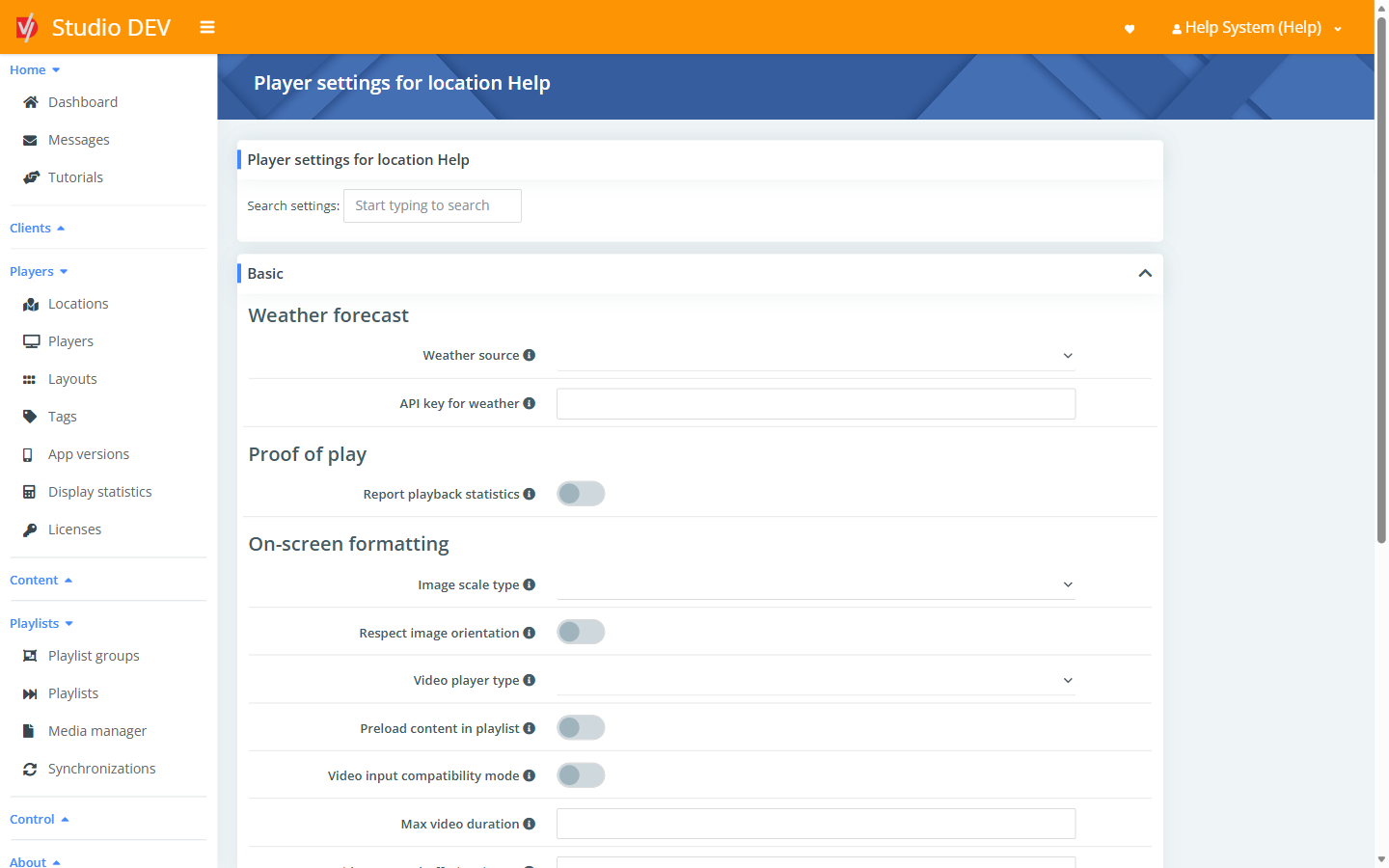
| Setting |
Description |
| Weather source |
The online service used for weather data feeds: HERE Destination weather, MET Norway (yr.no), Open-Meteo, OpenWeatherMap (paid account only) or OpenWeatherMap. |
| API key for weather |
The API key for the weather service. For OpenWeatherMap, get one free at openweathermap.org/appid. For HERE, get one free at developer.here.com/projects. Not needed for Open-Meteo. Check the provider’s licensing before use. |
| Setting |
Description |
| Report playback statistics |
Reports display statistics for every media file every two minutes. Reload required. |
| Setting |
Description |
| Image scale type |
How images and videos fit the zone: Center (no scaling), Center crop (fill, cutting off edges), Fit center (whole image visible, may leave bars) or Fit to screen (stretch). Reload required. |
| Respect image orientation |
Reads the orientation stored in JPEG (EXIF) data and rotates the image to match. Slightly lowers performance. |
| Video player type |
The internal video engine: Native Android player, ExoPlayer + SurfaceView, ExoPlayer + SurfaceView + Tunneling or ExoPlayer + TextureView. If videos stutter or won’t play, try another option. Reload required. |
| Preload content in playlist |
Loads upcoming items (for example videos) in advance, so the gap between files is shorter. |
| Video input compatibility mode |
Only for the Zidoo Z9X box. Reload required. |
| Max video duration |
The longest a video may play, in seconds. Only for older devices where videos get stuck. |
| Video stream buffering (in ms) |
How much of a network stream to buffer before playback starts. ExoPlayer only. Reload required. |
| CSS style for Excel |
Advanced. CSS rules for displaying Excel files, for example font-size:120%. |
| Mute video for audio playlist |
Mutes video sound while an Audio only playlist is playing, so the two don’t mix. |
| Show YouTube controls |
Shows the control slider on YouTube videos. Reload required. |
| Show captions from YouTube |
Shows YouTube subtitles. Doesn’t work with auto-generated captions. Reload required. |
| Force audio passthrough |
Sends the audio track straight to the TV or receiver. Only with ExoPlayer + SurfaceView, and needs device and TV support. Reload required. |
| Display PDF as scrollable |
Scrolls PDFs vertically instead of showing them page by page. |
| Setting |
Description |
| Storage for media |
Where downloaded content is stored: the device’s internal storage, or an SD card or USB drive. External storage must always be present while the app runs. Reload required. |
| Action on Flash drive insert |
What happens when a USB flash drive is plugged in: Copy files from Flash drive, Delete files from device and copy from Flash drive, Do nothing or Play files from Flash drive. |
| Folder on Flash drive |
The folder to copy from. Empty means the root of the drive. |
| Priority folder on Flash drive |
If this folder exists on the drive, only it is used and the regular folder is ignored. Leave empty to skip. |
| Target folder from Flash drive |
Where copied files go inside the app. / means the root folder. |
| Setting |
Description |
| Enable OSC communication |
Lets other systems control the player using the Open Sound Control (OSC) protocol. Reload required. |
| OSC protocol |
TCP or UDP. Reload required. |
| OSC network port |
The port the app listens on for OSC commands. Reload required. |
| Setting |
Description |
| Maximal length of RSS title |
Cuts headlines longer than this many characters, so the text doesn’t shrink too much. Applies the next time the feed is fetched. |
| Maximal length of RSS message |
The same, for the message text. |
| Setting |
Description |
| Default volume in % |
Volume for videos, music and internet radio, from 0 to 100. |
| Language |
The language of the app’s on-device menus: Chinese (Simplified), Croatian, Czech, Dutch, English, French, German, Italian, Japanese, Korean, Polish, Portuguese, Russian, Slovak, Slovenian, Spanish or Turkish. |
| User agent for HTTP requests |
The user-agent header the app sends when loading web pages and content. Reload required. |
| Allow uploading all file types |
Accepts all file types (not just supported media) through the file manager, file synchronization and USB. |
| Keep screen on |
Stops the screen from sleeping while the app runs. Reload required. |
| Keep the background service |
Keeps the app’s web interface, FTP and other services running even when the app isn’t in the foreground. |
| Enable watchdog service |
Restarts the app if it’s out of the foreground for more than 2 minutes. Only for devices used solely for DigitalVI. Device restart required. |
| Setting |
Description |
| Default web page zoom |
Zoom for web pages, in percent. 0 means the system default. Can be overridden per .url file. |
| Disable security for web pages |
Turns off CORS and HTTPS certificate checks for web pages. Very insecure. Only use it if you understand the risk. Reload required. |
| Allow local API for web pages |
Lets web pages shown on screen use the player’s local JavaScript API. Reload required. |
| Clear web cache on start |
Clears cookies, form data and web storage every time the app starts. Reload required. |
| Grant web pages permissions |
Automatically lets web pages use the camera, microphone and so on. |
| Use Chromium WebView |
Uses the Chromium-based web engine. Reload required. |
| Setting |
Description |
| HTTP port number |
The port for the player’s local web interface. Ports below 1024 need a rooted device and a free port 8080. Reload required. |
| HTTPS port number |
The secure web interface port. Ports below 1024 need a rooted device and a free port 8443. Reload required. |
| FTP port number |
The FTP interface port. Ports below 1024 need a rooted device and a free port 8021. Reload required. |
| Disable all non-SSL network interfaces |
Turns off HTTP and FTP, which aren’t secure on public networks. Reload required. |
| Allow reset password |
Allows resetting the local admin password through the web interface. Needs physical access to the device. |
| Disable HTTPS security for loading data |
Skips certificate checks when loading weather, RSS, file sync and similar data. Very insecure. Reload required. |
| Devices group code |
A shared code that lets players discover each other. Use the same value on all your devices, or leave empty to turn discovery off. Reload required. |
| Enable device discovery on the internet |
Discovers other devices over the internet, not just the local network. Reload required. |
| NTP server address |
The time server used to keep the clock accurate. |
| Setting |
Description |
| Interval for sending HDMI CEC command |
How often, in seconds, to send the command below. Reload required. |
| HDMI CEC command to be sent |
A CEC command sent to the TV over HDMI on that interval, for example to keep it powered on. Leave empty to send nothing. |
Counts viewers using a camera attached to the player.
| Setting |
Description |
| Camera for face detection |
Which camera to use. Leave empty to turn face detection off. Camera permission must be granted on the device (on-screen menu → Basic settings → Request camera permission). Reload required. |
| Frame rotation for face detection |
Rotates camera frames by 0, 90, 180 or 270 degrees. |
| Delay between frames for face detection |
Milliseconds between processed frames. Higher values use less CPU. |
| Use raw image format |
Uses raw instead of JPEG images. Depends on the hardware. |
| Preferred camera image width |
The picture width to request. Empty means the largest available. Reload required. |
| White balance mode |
The camera’s white-balance mode. |
| Exposure compensation |
Brightness adjustment for auto-exposure. |
| Detect eyes |
Also detects eyes. More accurate but slower. |
| Minimal width of a face (in %) |
Faces narrower than this share of the image aren’t counted. Reload required. |
| Minimal number of opened eyes |
The minimum probability of open eyes for a face to count, from 0 to 2. Reload required. |
For Samsung and other professional displays.
| Setting |
Description |
| MagicINFO server address |
The address of a Samsung MagicINFO server. |
| IR lock enabled |
Disables the physical remote control. |
| Source lock enabled |
Stops the input source from being changed. |
| Message display enabled |
Shows the display’s on-screen system messages. |
| Setting |
Description |
| Synchronization interval |
How often, in seconds, automatic file synchronization runs. Reload required. |
| How often to check files |
How often, in seconds, to check for files scheduled for deletion. Needs an internet connection for accurate time. Reload required. |
| Google Docs convert settings |
How Google Docs are converted to PDF. For a landscape display use top_margin=0.1;bottom_margin=0.1;left_margin=0.1;right_margin=0.1;size=16x9;portrait=false. |
Reboots the device if the network is lost.
| Setting |
Description |
| IP address for pings |
The address or hostname to ping. Leave empty to turn the watchdog off. Reload required. |
| Ping default gateway |
Pings the router instead of a fixed address. Reload required. |
| Delay between pings (in s) |
Seconds between pings. Reload required. |
| No. of failed pings for reboot |
Consecutive failures before the device reboots. Rooted devices only. |
| Setting |
Description |
| Disable keyboard |
Turns off keyboard shortcuts for controlling the app. |
| Enable touch gestures |
Allows touch gestures on the screen. |
| Protect screen with password |
Requires the web-interface username and password for any action on the screen, such as opening menus or settings. |
| Setting |
Description |
| Screen orientation |
Default, Landscape, Portrait, or Rotate 0°/90°/180°/270° using the orientation sensor (rooted devices only). Support depends on the hardware. Reload required. |
| Allow multi-display |
Shows content on every display connected to the device, not just the main one. Set up per-display playlists in the layout builder. Reload required. |
| Rotate layout every day |
Flips the layout every 24 hours to prevent screen burn-in. |
| Use screen layout intervals |
Picks the layout from layout intervals instead of the layout schedule. Reload required. |
| Wait with screen layout change |
Waits until the current item in the main zone finishes before switching layout, so a video isn’t cut off mid-way. |
| Length of showing playlist manually |
Seconds a manually chosen playlist plays when its action is Loop until timeout. |
| Reset order on playlist change |
Restarts alphabetical playlists from the beginning when the playlist changes. Otherwise the position is remembered. |
| Setting |
Description |
| Start at system boot |
Starts the app automatically when the device boots. On Android 10 and newer this may need to be set from the on-screen menu → Basic settings. |
| Enable kiosk mode after start |
Locks the app in the foreground (Lock Task Mode). Set up the device administrator first. Use carefully: this can lock the device completely. Needs a Kiosk mode license. |
| After start script |
Shell commands run after the app starts. |
| Reboot time (watchdog) |
Automatically reboots the device. Enter a number of hours after start (for example 24), a daily time (03:00), or a time every Nth day (23:00x3 = every third day at 11 PM). Empty means no automatic reboot. Rooted devices only. Reload required. |
| Reboot on HDMI plug in |
Reboots when an HDMI cable is connected. Helps some devices with video decoding problems. |
| Force the app as launcher |
Makes DigitalVI the device’s home-screen app. |
For connecting sensors, buttons or external controllers, and for bridging them to MQTT.
| Setting |
Description |
| Serial port path |
USB for serial over USB, or /dev/ttyXX for a direct serial port. Leave empty to turn it off. Reload required. |
| Serial port baud rate |
Usually 4800, 9600, 19200, 38400 or 57600. Reload required. |
| Serial port data bits / stop bits / parity |
Serial line settings. They must match the connected hardware. |
| MQTT server address |
The MQTT broker to relay serial data to and from. |
| MQTT username / MQTT password |
Broker credentials. |
| Require TLS for MQTT |
Uses an encrypted connection. |
| Use websockets for MQTT |
Connects over websockets. |
| MQTT topic (writing to serial) |
Messages on this topic are written to the serial port. |
| MQTT topic (reading from serial) |
Data read from the serial port is published to this topic. |
